Configure dask for parallel processing
Most computations in MintPy are operated in either a pixel-by-pixel or a epoch-by-epoch basis. This implementation strategy allows processing different blocks (in space or in time) in parallel. For this purpose, we use the Dask library for its dynamic task scheduling and data collection. Dask support is currently implemented in ifgram_inversion.py and dem_error.py only (expansions to other modules are welcomed) through a thin wrapper in mintpy.objects.cluster. We have tested two types of clusters:
- local cluster: on a single machine (laptop or computing node) with multiple CPU cores, suitable for laptops, local cluster/stations and distributed High Performance Cluster (HPC). No job scheduler is required.
- non-local cluster: on a distributed HPC with job scheduler installed, including PBS, LSF and SLURM.
Here is an entry-level presentation on parallel computing using Dask by David Grossman. Below we brief describe for each cluster/scheduler the required options and recommended best practices.
1. local cluster
The parallel processing on a single machine is supported via Dask.distributed.LocalCluster. This is recommended if you are running MintPy on a local machine with multiple available cores, or on an HPC but wish to allocate only a single node’s worth of resources.
1.1 via command line
Run the following in the terminal:
ifgram_inversion.py inputs/ifgramStack.h5 --cluster local
ifgram_inversion.py inputs/ifgramStack.h5 --cluster local --num-worker 8
1.2 via template file
Adjust options in the template file:
mintpy.compute.cluster    = local
mintpy.compute.numWorker  = 4     #[int > 1 / all], auto for 4 (local) or 40 (slurm / pbs / lsf), set to "all" to use all available cores.
and feed the template file to the script:
ifgram_inversion.py inputs/ifgramStack.h5 -t smallbaselineApp.cfg
smallbaselineApp.py smallbaselineApp.cfg
numWorkers = all will allocate os.cpu_count() number of workers to the dask computation (for local cluster only). If the specified number of workers exceeds system resources, os.cpu_count()/2 number of workers will be submitted instead to avoid overtaxing local systems.
1.3 Testing using example data
Download and run the FernandinaSenDT128 example data; then run with and without local cluster:
cd FernandinaSenDT128/mintpy
ifgram_inversion.py inputs/ifgramStack.h5 -w no --cluster no
ifgram_inversion.py inputs/ifgramStack.h5 -w no --cluster local --num-worker 8
A typical run time without local cluster is 30 secs and with 8 workers 11.4 secs (Xeon E5-2620 v4 @ 2.10GHz).
1.4 Runtime performance test on Stampede2
To show the run time improvement, we test three datasets (South Isabela, Fernandina, and Kilauea) with different number of cores and same amount of allocated memory (4 GB) on a compute node in the Stampede2 cluster’s skx-normal queue. Results are as below:
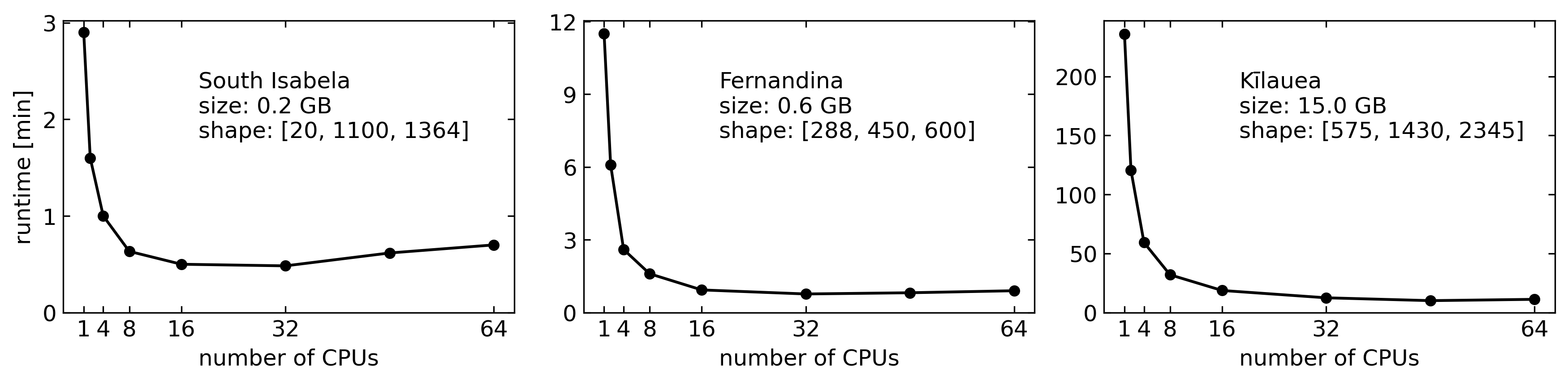
1.5 Known problems
As of Jun 2020, we have tried on one HPC system where local cluster worked on the head node but not on compute nodes. We attribute this to HPC configuration but don’t know what exactly is the cause.
2. non-local cluster on HPC [work in progress]
Note: This has not been tested much. SlurmCluster works for us using a shared queue (on XSEDE’s comet at SDSC) but not LSFCluster (on Miami’s pegasus). We believe this is caused by the HPC configuration, but we don’t know by what. Please tell us if you have an idea.
PBScluster did not work either. But we tested only on a small server without shared disk space between the workers and the client (the compute and login nodes respectively). This leads to the dask workers running on the compute nodes being unable to use mintpy code as the codebase is local to login node (see this issue).
The parallel proceesing on multiple machines is supported via Dask-jobqueue. One can specify configuration either with keyword arguments when creating a Cluster object, or with a configuration file in YAML format. MintPy assumes the YAML configuration file only.
We provide an example YAML configuration file, besides the dask.yaml, distributed.yaml and jobqueue.yaml files in ~/.config/dask installed by dask by default. One can copy it over to the ~/.config/dask directory as below for dask to identify and use it.
cp $MINTPY_HOME/src/mintpy/defaults/mintpy.yaml ~/.config/dask/mintpy.yaml
Note on DASK_CONFIG: Besides the default ~/.config/dask directory, one can use the DASK_CONFIG environment variable to use a custom directory to store the configuration files. However, it has lower priority than the default directory; and it is generally NOT recommended.
2.1 via command line
Run the following in the terminal:
ifgram_inversion.py inputs/ifgramStack.h5 --cluster slurm --config slurm --num-worker 40
ifgram_inversion.py inputs/ifgramStack.h5 --cluster pbs   --config pbs   --num-worker 40
ifgram_inversion.py inputs/ifgramStack.h5 --cluster lsf   --config lsf   --num-worker 40
2.2 via template file
Adjust options in the template file as below
mintpy.compute.cluster   = slurm #[local / lsf / pbs / slurm / none], auto for none, job scheduler in your HPC system
mintpy.compute.numWorker = 40    #[int > 1], auto for 4 (local) or 40 (slurm / pbs / lsf), number of workers to use
mintpy.compute.config    = auto  #[name / no], auto for none (to use the same name as the cluster type specified above), name of the configuration section in YAML file
and feed the template file to the script:
ifgram_inversion.py inputs/ifgramStack.h5 -t smallbaselineApp.cfg
smallbaselineApp.py smallbaselineApp.cfg
2.3 Configuration parameters in ~/.config/dask/mintpy.yaml
We provide a brief description below for the most commonly used configurations of dask-jobqueue for MintPy. Users are recommended to check Dask-Jobqueue for more detailed and comprehensive documentation.
-
name: Name of the worker job as it will appear to the job scheduler. Any values are perfectly fine.
-
cores: Total number of cores your code could possibly use (not the number of cores per job/worker). It is recommended to check with your HPC cluster admin, or your HPC cluster documentation to find the number of cores that are available per compute node on your system. It is recommended to not exceed the total cores per compute node. Required parameter for dask_jobqueue cluster objects with a non-null value.
-
memory: Total amount of memory your code could possibly use (not the memory per job/worker). It is recommended to check what the maximum memory available on a compute node on you system is before setting this value. It is recommended to set this to a reasonably high value so as to ensure the dask workers do not run our memory while performing their calculations, which will result in the processing routine failing. Required parameter for dask_jobqueue cluster objects with a non-null value. For systems that do not use the —mem directive in their job specifications, please see the section on the ‘header-skip’.
-
processes: Number of python processes you would like your code to use per job. For compute nodes with many cores, each core can often handle multiple running processes at a time which allow for faster computations and lower running times, without effecting slowing down the queuing time by requesting additional physical resources (cores and memory).
If left as
null, this value will automatically be set to~sqrt(cores)so that the number of processes and threads per process are approximately equal. Processes can be thought of as the number of workers a given compute core can handle simultaneously, so, by settingprocesses: 1as in the defaultmintpy.yamlfile, each core handles a single worker at a time, and then begins working on the next one after completing the previous one. Ifprocesses: 5, each core works on 5 workers at a time, and begins handling another worker as soon as any one of the previous 5 have completed.It is generally recommended by dask to keep the number of processes low and instead to request additional physical resources, as specifying too many processes on some systems has been known to lead to failed jobs and workers.
-
walltime: Maximum amount of time your job is permitted to run on a compute node before it is killed by the node. Walltimes are required to ensure users and jobs cannot hog nodes for extended periods of time without doing any substantial computations. Most queues have maximum allowed compute times, after which still running jobs will be terminated, but this is often on the order of 48+ hours.
It is recommended to use relatively short walltimes for MintPy (the test dataset uses
wall time: 00:30:00(30 minutes)) to have a higher priority in the job queue, but not too short, or your job may never connect to the dask scheduler and finish its computation (when in doubt, start small and work towards larger wall times as needed).Note that the walltime format changes slightly depending on the job scheduler that is in place on your HPC system. For
LSFschedulers, walltime is accepted and expected to be inHH:MMformat, whileSLURMandPBSschedulers only accept walltime inHH:MM:SSformat. -
queue: Scheduler queue to submit your jobs to. Most systems have several different queues with different amounts and types of resources you can request. For this reason, it is important to check with your HPC cluster admin or documentation to determine the most appropriate queue and what resources are available on that queue. Requesting for more resources (core, memory, nodes, etc.) on a queue than are available often leads to your jobs being rejected from queue, and can, on some systems, lead to fines or account suspensions.
-
project: Project allocation associated with your account. Most HPC systems bill projects based on the amount of resources requested, or allocate projects certain allowances based on grants or other funding, so it is important to specify the proper project for your jobs to be associated with.
-
interface: Network interface being used by your HPC cluster. For all tested clusters, this has been the
ib0interface. Available network interfaces can be fond by runningipconfigon your login node. -
job-extra: This allows you to specify additional scheduler parameters that are not support out of the box by dask. For example, some
SLURMclusters require the presence of the--nodesSBATCH directive in order to be accepted by the job scheduler, but dask does not use this directive directly. It can instead be specified in thejob-extraarray, and will be written with the other directive at submit time.